Checkout API
Programatically generate checkout links via an API
Splitmo's Checkout API allows you to create a powerful checkout experience without having to build your own. You can now streamline your payments integration using our pre-built user-friendly hosted checkout page. We have simplified the checkout process for customers while ensuring a secure digital payment experience.
This is an API payment integration that provides merchants with a checkout page for accepting one-time payments. Developer experience is needed.
How to start integrating your website to Splitmo Checkout API?
Generate Checkout link through Splitmo API. The API uses Basic Authentication, follow the steps below to get started. Splitmo Dashboard will provide public key and secret key as username and password for Basic Authentication.
Step 1 - Create a Splitmo API Key
Create authentication key by going to your Splitmo Merchant Dashboard Settings
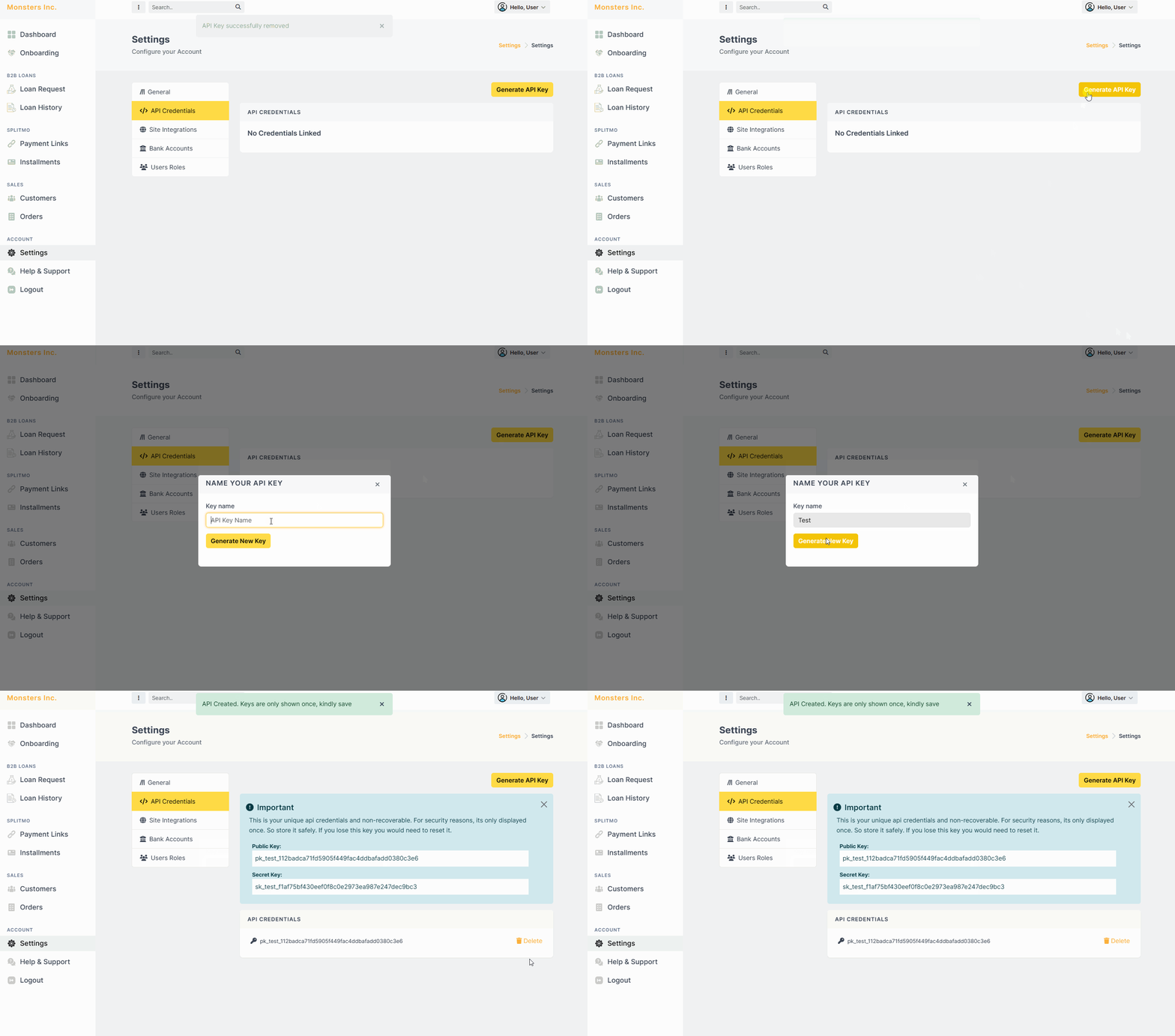
The generated API credentials will only be visible once created. Make sure to store your API credentials in a secured environment.
Step 2 - Generate your first Checkout Link
You are almost ready to create your first checkout link. In generating your checkout link you must be ready with the following:
- External UUID - Reference ID from your end. A random UUID will be generated if not supplied any.
- Transaction Amount
- Repayment Term and Schedule Type - check the Splitmo Repayment Terms
- Billing Details (Optional) - You can pre-fill customer's billing details. If not supplied, customer will be asked to fill up billing details during splitmo checkout.
- Redirect Urls (Optional) - You can supply a redirect URL after a success or failed transaction.
Now that you considered a following, let's try and create your first transaction with this example request body:
This example creates a Monthly (MO) installment for 2 months amounting PhP 1,000.00.
{
  "external_uuid": "YOUR-MERCHANT-REFERENCE-ID",
  "amount": 1000.00,
  "customer": {
    "first_name": "Juan",
    "last_name": "Dela Cruz",
    "email": "juan@example.com",
    "mobile": "MOBILE-NUMBER"
  },
  "billing_details": {
    "full_address": "Splitmo World",
    "city": "QC",
    "zip_code": "0000",
    "region": "NCR",
    "country_code": "PH"
  },
  "redirect_urls": {
    "success_url": "https://yoursite.com/?status=success",
    "failure_url": "https://yoursite.com/?status=failed",
    "cancel_url": "https://yoursite.com/?status=canceled"
  },
  "currency": "PHP",
  "schedule_type": "MO",
  "repayment_term": 2,
  "description": "Your Product Details"
}
Now let's try creating a Direct payment transaction
{[..]
  "redirect_urls": {
    "success_url": "https://yoursite.com/?status=success",
    "failure_url": "https://yoursite.com/?status=failed",
    "cancel_url": "https://yoursite.com/?status=canceled"
  },
  "currency": "PHP",
  "schedule_type": "DI",
  "description": "Your Product Details"
[...]}
In this example above, we've created a Direct (DI) payment transaction type. As you can see we have not supplied a repayment_term in the request body. Since it is a direct payment, we won't be needing to supply its repayment_term since it will default to 0.
You can try creating request by checking our API Reference Playground
Step 3 - Share the checkout link
After a successful creation of checkout link, a sample response will be created:
{
  "customer": {
    "first_name": "Juan",
    "last_name": "Dela Cruz",
    "email": "juan@example.com",
    "mobile": "09984254308"
  },
  "billing_details": {
    "full_address": "string",
    "city": "string",
    "zip_code": "string",
    "region": "string",
    "country_code": "PH"
  },
  "redirect_urls": {
    "success_url": "https://yoursite.com/?status=success",
    "failure_url": "https://yoursite.com/?status=failed",
    "cancel_url": "https://yoursite.com/?status=canceled"
  },
  "currency": "PHP",
  "amount": "1000.00",
  "schedule_type": "DI",
  "repayment_term": 1,
  "description": "string",
  "status": "INITIATED",
  "company": "Monsters Inc.",
  "checkout_url": "http://localhost:8000/transaction/4G-T-0413BC8E/",
  "external_uuid": "3feb1a26-ee25-4c82-a0da-0c989b6c69fc",
  "reference_id": "4G-T-0413BC8E"
}
Congratulations! You've know successfully generated your first checkout link via Splitmo API You can also checkout In-store Payment Guide.